
Headers (H1-H6) are more than just formatting - they organize your content for search engines and readers. A clear header structure helps search engines rank your page for the right queries, gives readers something to scan, and lets screen reader users jump straight to the section they need. The rules themselves are short: one H1 per page, a logical H1 → H2 → H3 order with no skipped levels, keywords where they read naturally, and CSS (not header tags) when all you want is a different text size. Fixing the common mistakes, like multiple H1s or skipped levels, is quick with tools like Hoverify.
What Are Header Tags and Why They Matter for SEO
What Header Tags Are
Header tags (H1–H6) play a crucial role in organizing your webpage’s content, acting like a table of contents that outlines your page’s structure. The H1 tag serves as the main headline, H2 tags introduce major sections, and H3 through H6 tags break those sections into smaller, more specific points. It’s important to note that header tags are different from the <header> element, which is typically reserved for introductory elements like your logo or navigation menu.
How Header Tags Improve SEO
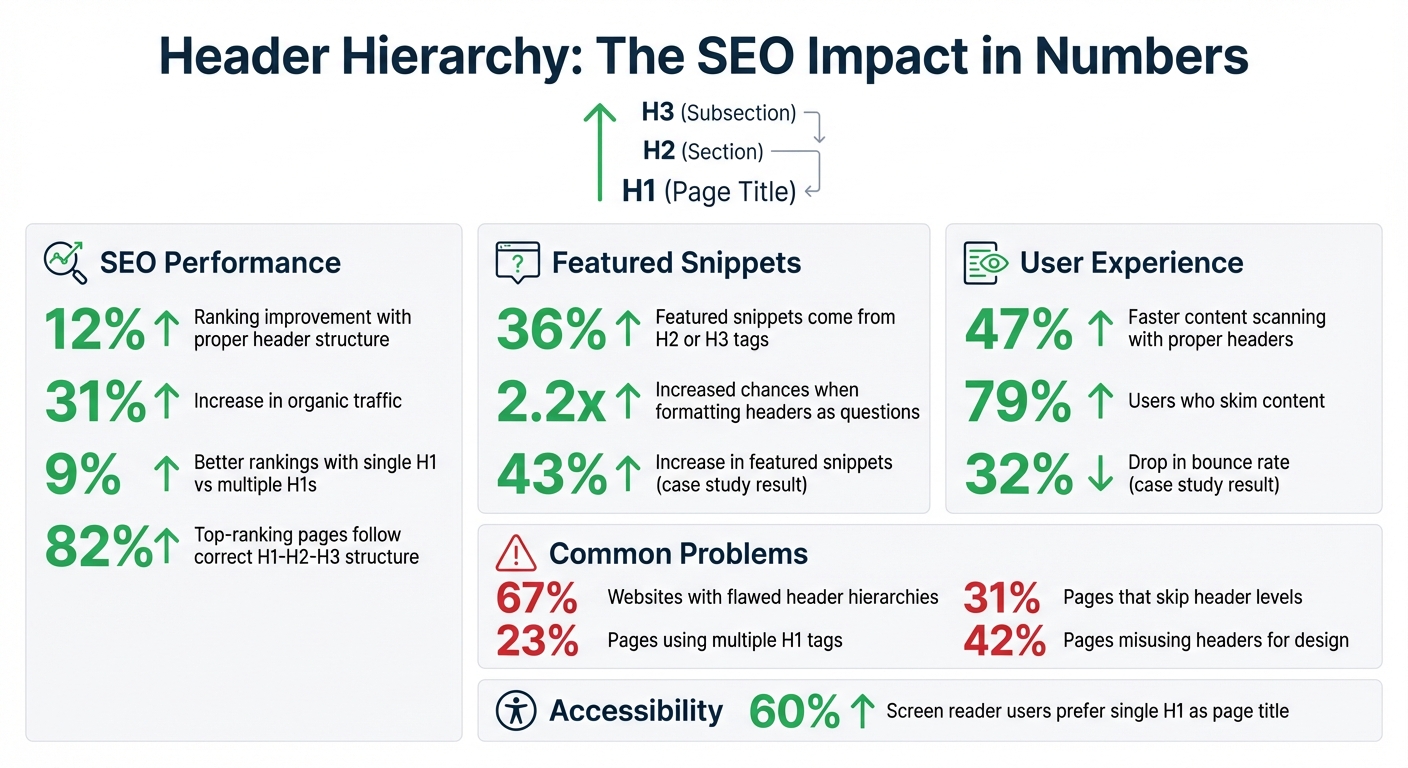
A clear header structure helps search engine crawlers understand the hierarchy and main topics of your content. This improves your chances of ranking for section-level queries and of appearing in featured snippets, which are often pulled from H2 or H3 sections. Phrasing some headers as questions further improves those odds.
Headers also play a key role in passage indexing, allowing Google to rank specific sections of your page for highly targeted search queries. This structured format not only boosts your SEO but also makes it easier for readers to navigate your content.
How Headers Affect User Experience
Most readers don’t consume content word for word - they scan. Well-designed headers act as clear signposts, making it easier for visitors to find the information they’re looking for. Headers speed up scanning and reduce cognitive strain, especially in longer articles where dense text might otherwise overwhelm readers. This improved readability helps lower bounce rates and keeps users engaged.
Headers also enhance accessibility. Screen readers rely on header levels to guide visually impaired users. By improving both readability and accessibility, headers contribute to a better experience for all visitors.
How to Structure Header Tags Correctly
Structuring header tags properly is essential for creating content that’s easy to navigate for both readers and search engines. A clear hierarchy not only improves user experience but also boosts organic traffic.
Use Only One H1 per Page
The H1 tag is the most critical header on your page because it signals to search engines and visitors what your content is about. Using just one H1 per page ensures a clear hierarchy and avoids confusion.
For best results, keep your H1 between 20–70 characters - this strikes a balance between being descriptive and concise. Make sure to include your primary keyword naturally, but prioritize readability.
Organize H2-H6 Tags in Order
After setting up your H1, arrange subsequent headers (H2, H3, etc.) in descending order without skipping levels. For instance, jumping from H2 to H4 can disrupt the structure, confusing search engines and creating accessibility issues for screen readers. Use H2 tags for major sections, H3 for subtopics within those sections, and reserve H4-H6 for more detailed, nested content like technical guides.
To improve readability, add subheadings every 200 to 400 words. This breaks up long text blocks and keeps readers engaged. Most readers skim, and this approach helps them quickly find the information they need. For informational articles, consider phrasing H2s as questions to improve your chances of earning a featured snippet.
Add Keywords Without Overstuffing
Incorporate keywords naturally into your headers. Place the primary keyword in your H1 and distribute secondary keywords across H2 and H3 tags. Use keywords where they read naturally; forcing them into every header looks like over-optimization.
The goal is to make your headers stand alone as an outline of your content. Readers should grasp your main points just by scanning the headings. Avoid filler phrases like “Introduction to” or “Overview of” to keep your headers concise and keyword-focused.
Up next, we’ll dive into common header tag mistakes to avoid.
Header Mistakes That Hurt Your SEO
Many websites suffer from header issues that negatively impact their search rankings. Flawed header hierarchies are among the most common on-page issues we see. The silver lining? These mistakes are relatively easy to identify and correct once you know what to look for.
Let’s break down some of the most common header mistakes and how to address them effectively.
Using Multiple H1 Tags
Using more than one H1 is one of the most common header mistakes, and it can confuse search engines by diluting the primary focus of the page. The H1 tag is meant to signal the main topic of your content, so having multiple H1s makes it harder for search engines to understand what your page is truly about.
To fix this, audit your site with tools like Screaming Frog or browser extensions such as HeadingsMap. Any additional H1 tags should be converted into H2 or H3 subheadings to create a logical hierarchy. Ideally, your H1 should be the first unique content element on the page, clearly outlining the topic.
Skipping Header Levels
Another common mistake is skipping header levels, such as jumping from an H2 to an H4. This disrupts the semantic flow of your content, making it harder for search engines to understand how subtopics relate to the main theme. It also trips up people using screen readers and other assistive devices, who rely on heading levels to understand the page and move around it.
A well-structured header hierarchy doesn’t just help search engines - it also improves user experience. Properly structured pages are easier to scan, and most top-ranking pages follow a clean H1–H2–H3 outline. To ensure consistency, always use headers in sequential order: an H4 should only appear under an H3, not directly under an H2. Tools like HeadingsMap can help you visualize your document’s structure and catch any skipped levels.
Using Headers for Design Instead of Structure
Many pages misuse header tags for visual styling rather than their intended purpose. For instance, some might choose an H2 because it looks bigger or an H4 because the H3 style doesn’t fit their aesthetic. This practice disrupts the logical flow of your page.
When headers are used for design rather than structure, search engines get misleading signals about content importance. High-level headers should highlight significant topics, not minor details. The solution? Use CSS properties like font-size, font-weight, and color to adjust the appearance of text while keeping your header hierarchy intact (H1 → H2 → H3).
| Mistake | Effect | Solution |
|---|---|---|
| Multiple H1 Tags | Confuses search engines about the page’s focus | Limit to one H1 per page; adjust extras to H2/H3 |
| Skipped Levels | Breaks structure and hurts scannability | Maintain a sequential H1→H2→H3 flow |
| Design-Based Headers | Misleads search engines; lowers ranking potential | Use CSS for styling; reserve headers for structure |
How to Optimize Headers with Hoverify

Hoverify’s SEO checker makes it simple to identify and fix header structure issues. By fine-tuning your headers, you can improve both your site’s search engine visibility and the overall user experience.
Analyze Headers with Hoverify’s SEO Tool
Hoverify’s Headers analyzer gives you a detailed breakdown of your H1–H6 structure and highlights common issues like skipped levels, duplicate H1s, and empty headings. The tool visually organizes your headers into a clear hierarchy, making it easy to spot inconsistencies, such as headers used for design rather than proper structure. This layout helps you see how search engines and screen readers interpret your page, so you can make smarter adjustments.
Two related checks live in the same extension and are worth running while you’re at it. Hoverify’s accessibility audit (in the Debug tool) has a Structure tab: its Headings view flags outline problems as WCAG issues, which matters because screen readers navigate by heading, and its Landmarks view shows whether the page wraps those headings in proper landmarks (main, nav, article and so on), since heading structure and semantic structure rise and fall together. The GEO checker scores semantic HTML as well, for AI search rather than screen readers. The whole accessibility audit exports as a PDF if you need to hand the findings to a client, or as Markdown if they’re going into a ticket.
Once you identify the problem areas, you can use Hoverify’s tools to fix them right away.
Edit and Test Headers in Real-Time
With Hoverify’s visual editor, you can select any header element and adjust its level instantly. For example, you can change an H4 to an H3, fix extra H1s by converting them to H2s, or completely reorganize your header hierarchy. The best part? You can see the changes live on your page as you make them. This real-time editing feature lets you experiment with different header structures to improve readability and flow. Once you’re happy with the results, you can either export the updated code or use Hoverify’s Custom Code feature to keep the changes during testing.
Conclusion
Your header hierarchy plays a real role in both SEO and user experience. A clear H1–H2–H3 structure gives search engines an outline of your page and gives readers a way to scan it. Skipping levels, using multiple H1 tags, or misusing headers for visual purposes confuses both. Formatting some headers as questions can also improve your chances of landing featured snippets.
Here are a few key takeaways:
- Use only one H1 per page.
- Maintain a logical, sequential order (H1 → H2 → H3).
- Naturally weave in keywords within your headers.
Broken header hierarchies are one of the most common issues we see when auditing pages. Hoverify’s Headers analyzer detects duplicate H1s and skipped levels in real time, so you can see how search engines interpret your structure and fix it before it costs you.
Header structure is one piece of on-page health - it pairs naturally with a broken-link check and the rest of our 5-minute site audit routine, all of which Hoverify’s SEO checker can run from one panel with a PDF export for client reports.